CASE STUDY
CORE EXPERIENCES, MOCHI MOBILE APP
ROLE
DESIGNER & UX RESEARCHER
TEAM
2 PRODUCT DESIGNERS
1 PM
4 SWEs
1 CONTENT DESIGNER
TOOLS
FIGMA
CURSOR
YEAR
H2 2025
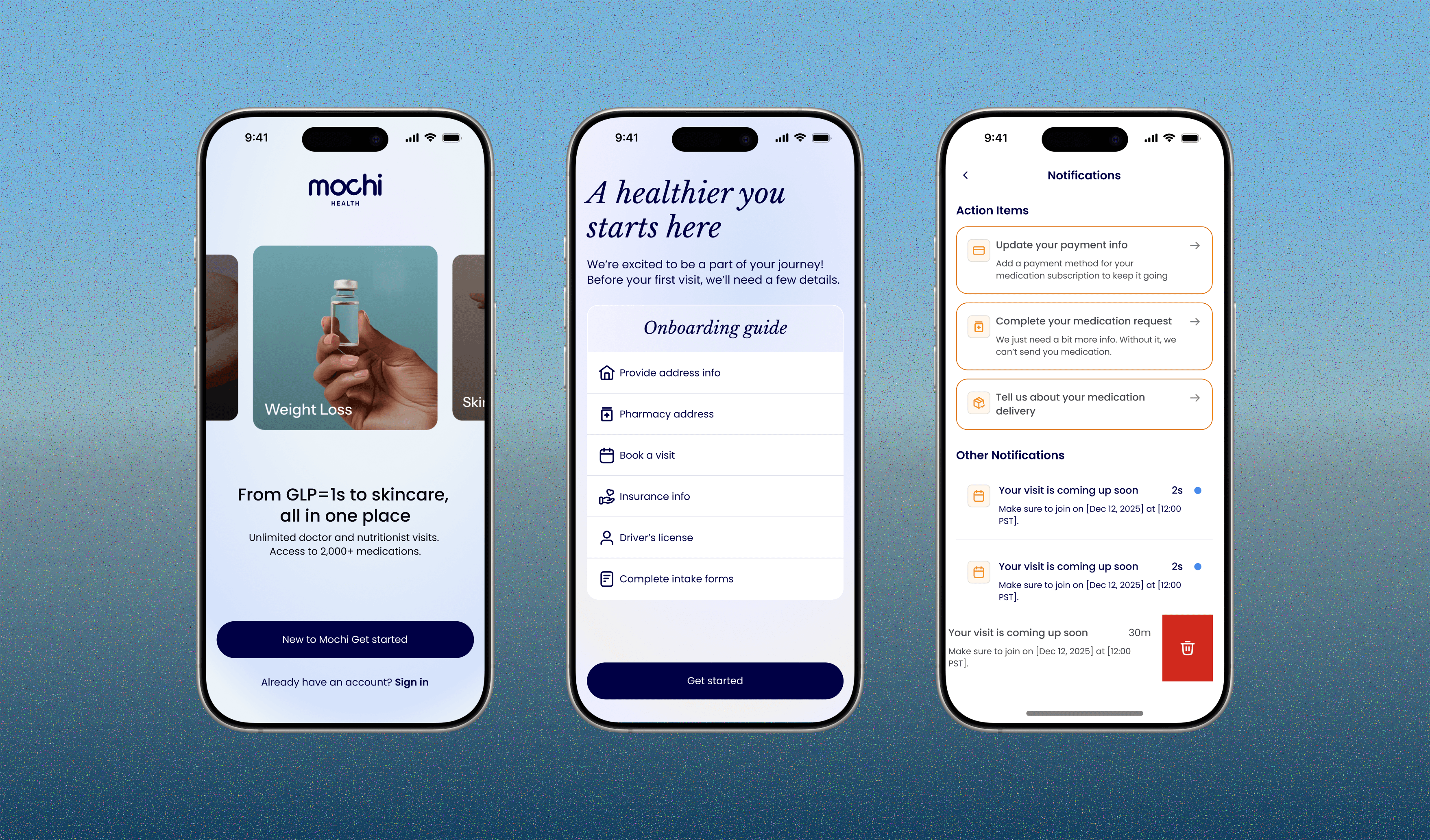
Redesigned core app experiences to clarify care status, surface key actions, and guide Mochi patients through next steps.
What was I responsbile for?
Led design across sign in, home, and notifications, partnering with product on scope and building prototypes to close the gap between concept and build.
I redesigned core mobile experiences (sign in, home, and notifications) to help patients better understand and manage their care. I worked with our PM to scope and sequence each release, balancing business goals and engineering constraints, and I built and maintained the iOS design system. I prototyped in Cursor to validate ideas early, so engineers could move straight from working prototypes into implementation.

App reviews
Why did we need to work on perfecting the mobile app?
Working with my PM, we first asked whether a mobile redesign was worth doing, since most patients used the web app. But about 30% relied on mobile as their only way to manage their care, so a weak app meant real friction for them.
We saw a chance to make mobile a place patients could rely on, with a simpler, more trustworthy way to understand and manage their care. Getting the core experiences right also laid the groundwork for what came next: a consistent design system and clearer patterns on home meant future features wouldn't be bolted onto a fragmented app.
Let's take a look into these refreshes!
Home

Before and after
How did we get started?
Home was the first screen patients saw every time they opened the app, and it was quietly failing at its most basic job: telling patients where they stood in their care and what to do next.
This wasn't 0-to-1 effort, but it wasn't a straight web-to-mobile port either. The web app had just been reskinned, and mobile was our chance to go deeper. Our plan was to refactor core patterns based on new offerings, direction, and user feedback, with the plan that web would adopt them after mobile launched. That meant working closely with the design team to decide what to carry over, what to change, and where mobile needed to lead.
Heuristic Evalution
The first thing I did was to ask everyone on our design team and our PM to join me in evaluating the current home screen. This exercise helped us internally gauge how effective our home was and kick off discussions on potential improvements.

Consolidated spreadsheet of some of our observations
Pain Points
Through UX research and collaboration with patients and internal teams, I narrowed broad usability issues into three core pain points that guided the redesign.
👁️
Visual inconsistency increases cognitive load
Inconsistent typography, iconography, and spacing across sign-in, home, and notifications made the experience hard to navigate and understand at a glance
❓
Inconsistent interactions break learned patterns
Similar actions behaved differently across the app, forcing patients to relearn how to interact with familiar features and creating unnecessary friction
💔
Unclear communication can erode trust
Differences in tone and content presentation made information feel less cohesive. Unclear or inconsistent communication can increase anxiety and undermine patient trust
CORE PROBLEM
Home showed patients how much progress they'd made, but never what to do next. Critical information was reduced to badges and percentages, forcing patients to dig for context the screen should have surfaced directly.
How might we redesign home so that a patient can understand their care status and required next action without tapping into another screen?
Defining how we want Home to be experienced
Design Principles
Before designing any screens, I had to define how the system should behave. Calling out these principles gave the concept a foundation; a way to test every design decision against a consistent point of view.
🔔
Actions over information
Replace abstract numbers and statistics with clear next steps, helping patients understand what to do without extra effort
✨
Make every card count
Give every card a clear status or action, reducing confusion and helping patients focus on what matters
📱
Nothing critical goes off-screen
Design for every screen size so critical information and primary actions remain visible, accessible, and easy to find
ULTIMATE USER GOAL
"When I open the app, I want to immediately see what's happening with my care and what I need to do next, so I don't have to dig through menus to find out if something needs my attention."
Experimenting & iterating begins!
JTBD
"When I open the app, I want to see what I need to do and act on it quickly, so I don't miss something that delays my treatment."
V1 surfaced one primary onboarding card and hid the remaining action items behind "See more / See less," to avoid overwhelming patients while still driving action. However, upon feedback + testing, collapsed tasks made required actions easy to miss and added a tap just to see what was outstanding, which cut against the goal of getting patients to act.

V1
Going from V1 to final, I was balancing actionability against glanceability. Patients needed to see everything that mattered at a glance without feeling overwhelmed, but also be pushed to act on it.

Iterations
Information Architecture
Mapped the logic behind the home screen's cards with our PM and content designer, which revealed what patients needed most and in what order. From there, we set priority rules for when multiple cards are eligible and removal logic for when each resolves, so patients always saw a clear, cohesive view of what needed their attention.

Action item logic
Design System
I worked with the design team to build and maintain a mobile design system in Storybook, partnering with engineers to keep components in sync with code rather than drifting from a static spec. I used AI tools like Cursor to scaffold and iterate on components quickly, shortening the design-to-dev handoff loop.

Semantic color tokens

Atomic design system
Video made by: Michelle Dang, Brand Designer
Measuring success
I worked closely with our PM to translate the redesign's goals into measurable success criteria, aligning on which metrics were both meaningful to patients and trackable with our existing analytics and support tooling.
QUALITY
User experience
App Store rating
Support ticket volume tied to navigation/confusion
Task success rate & time-to-first-correct-action
In-app engagement quality
SCALABILITY
Design system foundation
Component reuse rate
Design QA/inconsistency bugs
Time-to-ship for next feature
ENGAGEMENT
User activity & retention
Action-item completion rate
Mobile usage share
Onboarding completion rate
Retention/re-engagement
Learnings
AI prototyping tools like Cursor let me turn ideas into working, interactive prototypes quickly, so I could show the team how a flow actually behaved rather than describe it. That sped up feedback from our PM and engineers, helped us compare directions early, and let us drop weak ones before investing further.